


We've all been there: wandering back and forth across the grocery store because your list is a jumbled mess. You grab the milk, then realize you forgot the cheese on the other side. By the time you're done, you've walked twice the distance and spent twice the time.
Today, we're excited to announce Lists—a powerful new feature in Goals AI that transforms how you shop. With automatic store identification and intelligent organization by store section, your shopping trips are about to get a whole lot faster.
How Lists Works
Lists is designed to be effortlessly smart. Just add items the way you naturally think of them—"broccoli," "olive oil," "beer"—and let Goals AI do the rest.
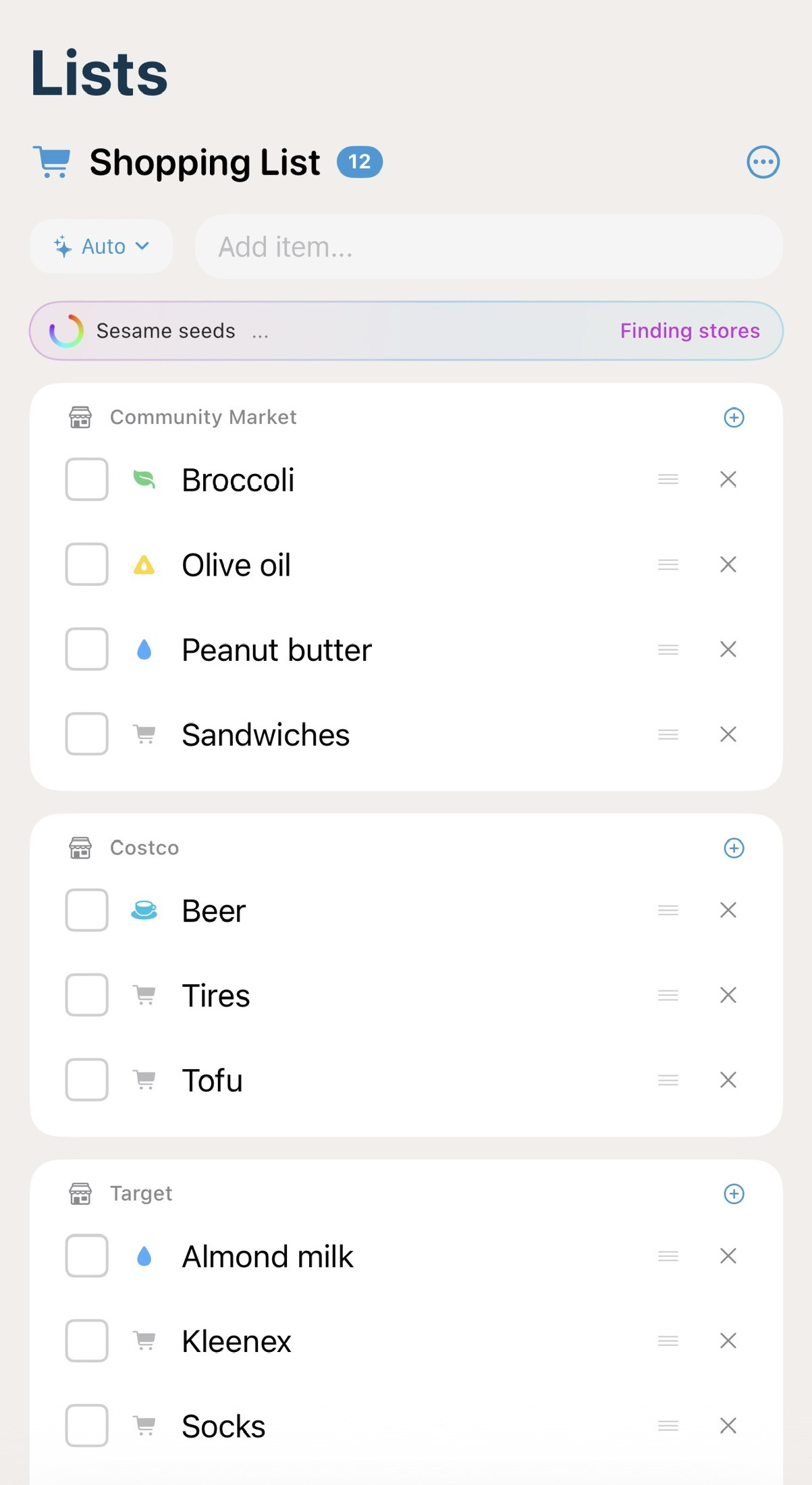
Automatic Store Identification
When you add an item, our AI automatically identifies which store is best for that purchase. Add "organic produce" and it routes to your local grocery store. Add "bulk paper towels" and it knows that's a Costco trip. No manual sorting required.
Smart Store Learning
Organized by Store Section
Here's where it gets really powerful. Within each store, your items are automatically organized by the section or aisle where you'll find them. Produce items group together. Dairy stays with dairy. Pantry staples cluster near each other.
- •Produce — Fresh fruits, vegetables, herbs
- •Dairy & Refrigerated — Milk, cheese, yogurt, eggs
- •Pantry — Oils, peanut butter, canned goods
- •Deli & Prepared — Sandwiches, rotisserie chicken
- •Beverages — Beer, wine, soft drinks
- •Household — Cleaning supplies, paper products
The result? You can work through your list in one efficient sweep through the store, instead of zigzagging back and forth.
Share with Your Household
Shopping is often a household activity. That's why Lists supports real-time sharing with your family or roommates. Everyone in your household can add items, check them off, and see updates instantly.
- Real-time sync — Add an item from your phone, it appears on your partner's device immediately
- Shared completion — When someone checks off an item, everyone sees it
- No duplicate purchases — See what's already on the list before adding
- Attribution optional — See who added what, or keep it simple
Pro Tip
The Auto Mode Experience
You'll notice a sparkle icon with "Auto" at the top of your list. This indicates that automatic store identification and organization is active. When you add a new item, you'll see a brief "Finding stores..." indicator as our AI processes where it belongs.
Within seconds, the item is categorized and sorted into the right store and section. It's like having a personal shopping assistant who knows every store's layout.
Manual Override
Of course, you're always in control. If you prefer to buy something at a different store than suggested, simply drag the item to move it. Lists respects your preferences and learns from your adjustments.
Why We Built Lists
My Best Day has always been about helping you focus on what matters most. We realized that shopping—while necessary—was stealing too much time and mental energy from the things that truly matter to you.
"The average person spends over 40 minutes per grocery trip. With better organization, we've seen users cut that time by 30% or more."
Lists isn't just about efficiency, though. It's about reducing the cognitive load of managing a household. When your shopping list organizes itself, that's one less thing occupying mental space that could be used for your goals and intentions.
Getting Started with Lists
Lists is available now in Goals AI for iOS and Android. Here's how to get started:
- 1Open Goals AI and tap the Lists tab in your navigation bar
- 2Create your first shopping list by tapping the + button
- 3Start adding items—just type naturally like "milk" or "birthday candles"
- 4Watch as items automatically organize by store and section
- 5Invite household members from Settings to share your lists
What's Next
We're just getting started with Lists. Coming soon:
- •Recipe integration — Add all ingredients from a recipe with one tap
- •Recurring items — Automatically add items you buy regularly
- •Price tracking — See price history and get notified of deals
- •Store-specific layouts — Even more precise aisle organization based on your local stores
Try Lists Today
Download Goals AI and experience smarter shopping with automatic store organization.
Download FreeWe'd Love Your Feedback
Lists is a new feature, and we're eager to hear how it works for you. Found a store that's not recognized? Items being miscategorized? Let us know through the feedback option in the app—your input directly shapes how we improve.
Here's to faster shopping and more time for what matters. Happy listing!